 Underwater 3D Animation for Divers
You already know underwater photogrammetry. Here is what comes next.
The pipeline after the scan, step by step: clean-up, materials, lighting, camera, post, map, edit. Which parts a diver's scan actually needs, which lesson covers each, and what I left out on purpose.
TL;DR
The gap after photogrammetry is not "learn 3D". It is seven specific problems: scale, materials, light, camera, contrast, orientation and the cut. Course 1 solves each of them on a real Baltic wreck and a real flooded mine. Retopology, water simulation and Unreal are real skills too, but they come after these seven, not before.
Every few weeks I get a version of the same message. "I've done the photogrammetry course. My models are clean. Now what?" Recently people have started asking an AI assistant instead of me, and the answer they get back is a learning path: clean the scan, retopologise, UV, bake, build PBR materials, then underwater rendering with volumetrics and caustics, then animation, then Unreal Engine for real time.
It is not a bad list. It is a list for someone who wants a career in 3D. If what you want is for the cave you scanned last month to look, on a screen, the way it looked in your light, most of that list can wait. Here is what cannot.
1. Scale, before anything else
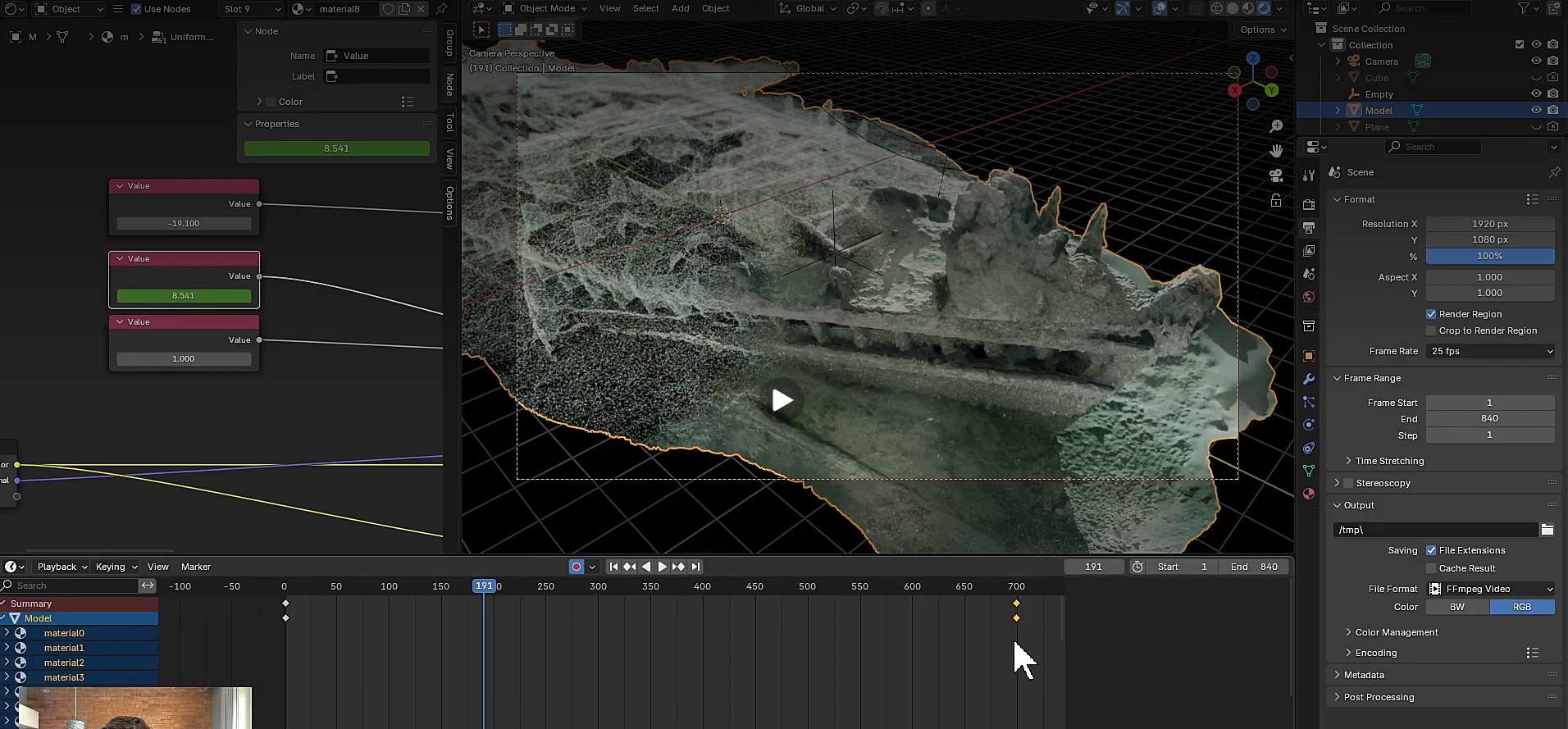
Water changes how a camera sees distance, so every underwater scan imports at the wrong size. The Baltic shipwreck I use in Lesson 1 is about 30 metres long. Blender thought it was 851. Nothing looks wrong until you add a light and a camera: the spotlight does nothing, depth of field behaves like a microscope, and you start turning knobs that were never the problem.
The fix takes a minute: type the real length into one dimension, copy the scale Blender computes into the other two axes. It is the first thing I do with any scan and the first thing the course does, in the free lesson.
2. Materials, forty at a time
Metashape hands you one material per texture. The wreck has forty. The Maria Concordia mine has fifty diffuse maps and fifty normal maps. If you change contrast in one material, the other forty-nine do not follow.
The course ships a node group and a script that rewrites every material on the model to share one group. Change it once and the whole scan updates. That same group carries the effect you see in the showreel, the wreck building itself from wireframe to solid. Lesson 1 runs the script; Lesson 2 explains why the textures are split the way they are and why it matters for close-ups.
3. Detail without weight
The instinct is to keep the 56-million-face mesh because it has the detail. It also has a viewport that lags on a high-end laptop and a repair job that is impossible at that density.
What a scan needs instead is a light mesh that looks heavy. In Lesson 2 you decimate the wreck to 500,000 faces and bake a normal map from the 2-million-face version. Side by side in Blender, the two are indistinguishable. In Lesson 3 you do it at mine scale in Metashape: 10 million faces down to 2 million, textures transferred in minutes rather than re-blended for hours, normal maps baked in about ten minutes.
This is where the AI list says "retopology and UVs". For a game character, yes. For a cave, decimation plus a baked normal map gets you the same render at a fraction of the effort, and the original geometry stays on disk for 3D printing, where normal maps are useless. I wrote a separate post on exactly this trade.
4. Light like a torch, not like a studio
A flooded corridor does not have three-point lighting. It has one diver and one lamp. The Lesson 3 camera rig is built that way: a spotlight parented to the camera, so wherever you fly, the light comes with you. Add a backlight behind the wreck in Lesson 1 and the geometry jumps out through shadow, the oldest trick in cinema.
Two numbers people never guess: the default spotlight is 10 watts, and a scan needs thousands. And a scan's world lighting has to be pulled down and tinted slightly blue, or the shadows go flat grey.
No caustics, no volumetric water, no floating particles in Course 1. I will be honest about why: they are expensive, they are fiddly, and a cave reads as underwater without them once the light, contrast and camera are right. They are the last five percent, and they belong in a later course.
5. A camera that moves like a diver
A wreck can be orbited. A mine cannot: from any single angle it is a wall. The camera has to swim through it.
Blender's walk mode is a first-person game: W forward, A and D to strafe, Shift to speed up. In Lesson 3 you press record, fly the practised route in one take, then let Blender sample the keyframes and smooth them with a Gaussian pass. The recording looks rough on take one and take five. That is normal; my own take in the lesson took plenty of attempts. The focus rides along on an empty you slide along the camera axis, so the far wall is sharp at the start and the squeeze is sharp when you are in it.
6. Contrast back in, after the render
A raw render loses the texture detail the scan had. Lesson 4 is a short one: the Compositor mixes the diffuse colour pass back over the image with a Soft Light blend, then an Overlay pass through a colour ramp. If you are result-oriented or simply lazy, it is two clicks, the setup ships with the lesson. If you want to know why, the nodes are explained one by one.
7. Orientation and the cut
Nobody watching a fly-through knows where they are after the second junction. Lesson 5 builds a minimap: a glowing pin driven by the fly-through camera's position over a wireframe overview, rendered as its own small animation. Lesson 6 puts it in the corner in CapCut, blurs a copy of the fly-through behind it for vertical formats, adds a title and music, and exports horizontal, vertical and square from the one render.
That is the whole pipeline: seven problems, six lessons, all free tools except your photogrammetry software.
The lessons, in the order the course takes them:
- Lesson 1 – Shipwreck animation and texture transitions (the free demo)
- Lesson 2 – More detail with less geometry: normal maps
- Lesson 3 – Virtual mine dive
- Lesson 4 – Enhancing the visuals in the Compositor
- Lesson 5 – Cave, mine or shipwreck dive minimap
- Lesson 6 – Video editing and compositing in CapCut
Two short setup videos (keyboard shortcuts, numeric keypad) come before Lesson 1 if Blender is new to you.
What I left out, and when to add it
- Retopology and manual UVs. After you have shipped a few animations and want a hero asset for a game engine. Not before.
- Caustics, volumetrics, sediment. A finishing layer for a specific shot. Planned for the advanced course.
- Unreal Engine, VR. When the deliverable is a walkthrough people control themselves. The optimised, normal-mapped model from Lesson 3 is exactly what Unreal wants as input, so nothing you learn here is wasted.
- After Effects. I use it for my own grading. The course promises free tools, so it stays out until the advanced course.
If you already scan and this list looks like your last six months of frustration, the first lesson is free. It runs the whole pipeline once, on the shipwreck, in 71 minutes.
Marcin Stempniewicz
Cave Diving 3D Photogrammetry Instructor · Underwater 3D Academy
Marcin Stempniewicz is a TDI Full Cave diver, technical wreck diver, and 3D artist based in Poznań, Poland. He founded the Submerged Foundation to document underwater environments that almost nobody will ever see in person -flooded mines, caves, and wrecks -and to bring them back to the surface as accurate, explorable 3D models.
His flagship project is the Maria Concordia flooded magnesite mine, supported by the XDEEP Exploration Support Program. Over hundreds of hours underwater, Marcin and his team worked through four labyrinthine levels and a 40-metre vertical shaft in cold, silt-prone, zero-margin conditions, capturing hundreds of thousands of photographs and reconstructing the entire mile-long site as a single coherent model. The same approach has taken him into the Marie Agnes silver-lead-zinc mine—some 12,000 photos over four dives—the Cold War-era Kowary uranium mine, and the flooded galleries of the Srebrna Góra fortress. He also collaborates with Poland's National Maritime Museum on the digital documentation of wrecks, where a cinematic 3D record is often the only form in which a vanishing site can be preserved.
That field experience is where U3DA comes from. Every scan Marcin has ever brought home hit the same wall: the photogrammetry software produces a mesh, and the mesh is not the story. Wrong scale, muddy textures, a viewer that only another specialist can read. The workflows, lighting rigs, shader setups, and Python scripts he built to solve that for his own expeditions became the course. Outside the water, Marcin co-founded Ar-range, a rendering platform that produces every product variant a furniture brand sells—millions of images from one 3D source—and the same batch-rendering and automation discipline runs through the U3DA workflows.
His work has appeared in InDepth (GUE), XDEEP ESP, divers24, and Podcast Spod Wody. He has presented at Hidden Earth (UK), the NSS Convention (West Virginia 2024, Tennessee 2025), Baltictech, and Dive Expo Belgium 2025, on how accurate 3D documentation changes both cartography and dive planning in overhead environments.
"The raw scan is not the product," Marcin says. "The story non-divers can experience is." At U3DA, he teaches divers, wreck surveyors, marine archaeologists, and underwater photographers—starting from zero Blender experience—how to turn their own scans into cinematic animations that a museum, a sponsor, or a family member can actually watch.
Surfaced with a scan the world should see?
U3DA turns your photogrammetry into full-HD renders, cave fly-throughs and finished dive videos in Blender. No 3D background needed. Start with the free first lesson.
Frequently asked questions
What should I learn after underwater photogrammetry?
Blender, but only the parts a scan needs: scale correction, shared materials, decimation with baked normal maps, torch-style lighting, a first-person camera, a Compositor contrast pass, and a simple video edit. That is the whole of U3DA Course 1.
Do I need to retopologise a photogrammetry scan before animating it?
Not for renders and fly-throughs. Decimate the mesh in your photogrammetry software, transfer the textures and bake a normal map from the dense version. The light mesh looks identical on screen. Keep the original for 3D printing.
How do you make a Blender render look underwater without simulating water?
A single spotlight parented to the camera, a backlight behind the subject, world lighting turned down and tinted slightly blue, depth of field on the camera, and a Compositor pass that restores texture contrast. Caustics and volumetrics are optional finishing layers.
Blender or Unreal Engine for underwater scans?
Blender first. It is free, opens any textured FBX and covers lighting, camera, rendering and post. Unreal comes later for real-time or VR walkthroughs, using the optimised model you already made.
How long does it take to get a first animation from a scan?
One sitting. The free first lesson goes from a Metashape export to a full-HD still and a build-up animation in 71 minutes of video; the 840-frame render takes about an hour on a normal machine.