 Underwater 3D Animation for Divers
Four ways to show an underwater 3D scan
A scan is finished when other people can see it. Blender renders, an Unreal Engine app, CaveViewer on the desktop, or a web viewer that streams the model to a browser: what each one gives the audience, what it asks of you, and how to pick.
TL;DR
Blender when you want to control every frame and hand over a video or a still. Unreal Engine when the audience steers and you can afford to build a product. CaveViewer when a team wants the whole map on their own machine, free, with no account. A streaming web viewer when the deliverable is a link. All four start from the same optimised, normal-mapped model.
The scan is reconstructed, cleaned and scaled. Now somebody who was not on the dive wants to see it. That is a different problem from making the model, and the answer depends on two questions: who holds the camera, and what will the other person install.
I use four ways to show a scan, and each one is right for a different audience. Here they are side by side.
The four options at a glance
| Blender render | Unreal Engine app | CaveViewer | Submerged Viewer | |
|---|---|---|---|---|
| What the audience gets | A video or a still | An app they walk around in | The full map on their own computer | A link that opens in a browser |
| Who holds the camera | You | They do | They do | They do |
| Where it runs | Your machine renders, anything plays the file | Their PC, with a proper graphics card | Their Windows, Mac or Linux desktop | Any laptop or phone with a browser |
| What you hand over | An MP4 or PNG | A packaged build, usually gigabytes | The map files, which they import once | A link |
| Lighting and look | Anything you can set up | Real-time lighting, cinematic if you know the engine | The scan as captured | The dive lighting baked into the scan, plus fog, particles and a colour grade |
| Model size | As heavy as your patience | Heavy, with Nanite | Built for very large maps | Streams by detail level, so the file size stops mattering |
| Skill to produce | Course 1 | A second course of study | Import the map; the first import takes a while | Upload and publish |
| Cost | Free | Free engine, expensive time | Free, no account | Free for the viewer |
| Best for | Talks, reels, documentaries, cross-sections | Museums, VR, training walkthroughs | Dive teams and explorers who want the map offline | Sharing with anyone, anywhere |
Blender: you decide what they see
Blender renders frames. You build the scene, place the camera, light the corridor, press a button, and some time later you have a picture or a video that looks exactly the way you set it up. The 1300-frame mine fly-through in Lesson 3 takes about two hours on my machine.
This is where most of what a diver actually publishes comes from. A fly-through for a conference talk. A reel. A cross-section of the mine with the veins in the wall, which is the image that made people outside diving look at the Maria Concordia project at all.
The trade is control for interaction. Nobody can turn the camera to look at the thing you did not film. That is a feature when you are telling a story and a limit when the audience wants to explore.
Everything in Course 1 lives here.
Unreal Engine: they hold the controller
Unreal draws sixty frames a second while someone moves through the scene. That is the whole point, and the whole constraint. Everything has to be cheap enough to draw sixty times a second, which is why the engine streams geometry with Nanite and approximates light with Lumen instead of tracing it.
When it works it is the most impressive of the four: a museum visitor walking a wreck, a headset, a training walkthrough where a dive team picks its own route. With the Sequencer you can also record cinema-grade footage from inside the engine.
What it costs is time. An interactive build is a product, not a render. You learn the engine, the materials, the packaging, and then you ship a build measured in gigabytes that needs a PC with a real graphics card on the other end. I am not going to pretend that is a weekend. If Blender is a course, Unreal is a second course of study.
None of it is in Course 1, and I say so on the course page. The optimised model you make there is exactly the asset Unreal wants, so nothing is wasted if you go that way later.
CaveViewer: the whole map, on their machine, offline
CaveViewer is a free desktop application built by Brian Deatherage and Zsolt Szabo of Bottomline Projects, Florida, for cave divers, explorers and cartographers. Windows, macOS and Linux. No advertisements, no subscription, no online account.
You import your own map, a textured OBJ with its MTL and textures or a GLB. The first import takes a while, because CaveViewer builds a cache of the whole map. After that it opens quickly, and it renders maps far larger than a normal 3D viewer would load. The documentation suggests 16 GB of RAM as a practical starting point and says integrated graphics are supported, so it runs on an ordinary laptop. For a large source map it can want a lot of free disk space while it builds its cache, so read the requirements page before handing it to someone.
It also has a free Map Library to download maps from, and it can record a route through a cave as a video and a path someone else can follow.
The trade is distribution. Everyone who wants to look installs the app and imports the map. For a dive team or a project partner who wants the complete model on their own machine, with no internet in the field, that is the right shape. For a hundred strangers on social media, a link is easier.
A streaming web viewer: the deliverable is a link
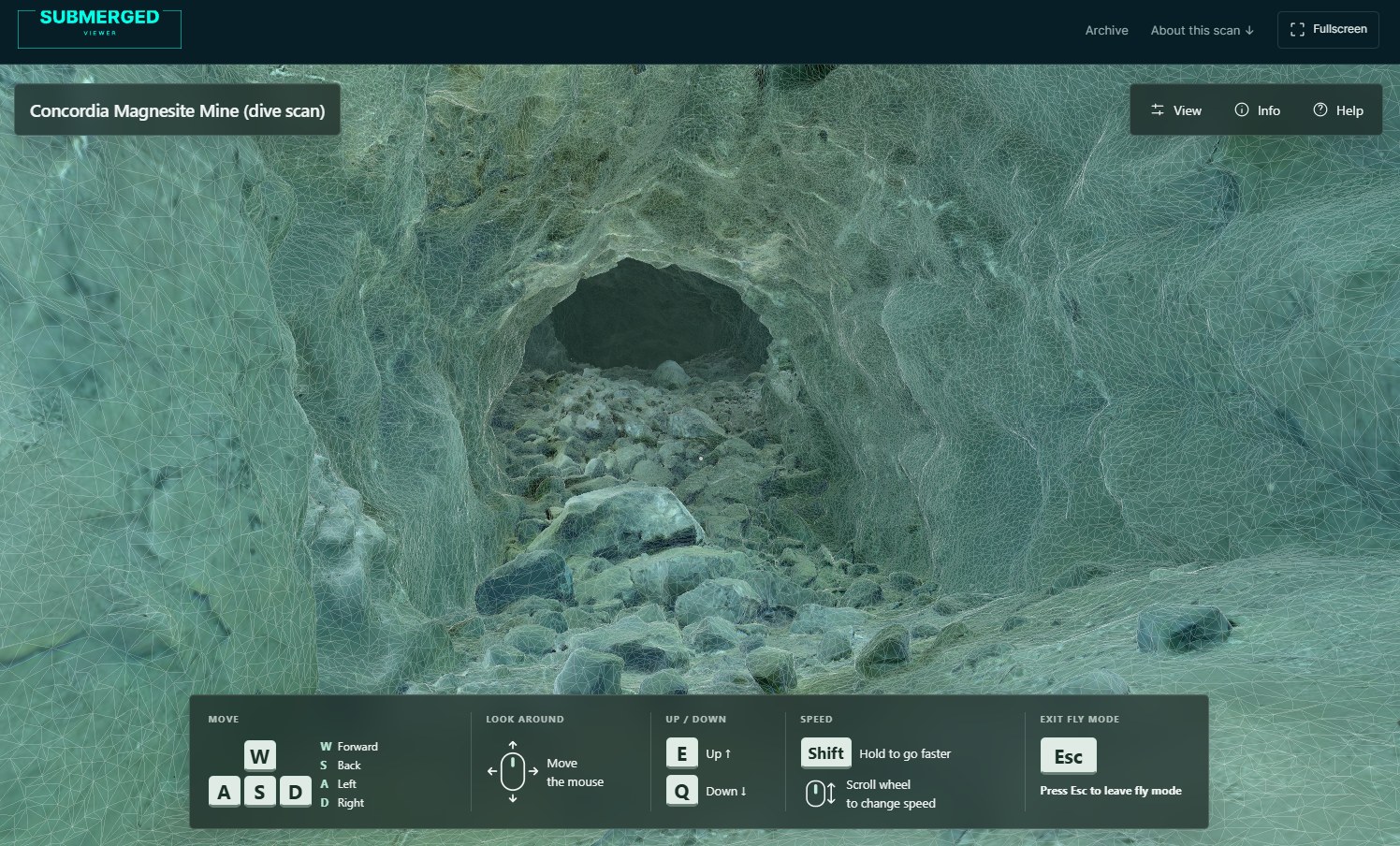
The fourth option is a viewer in the browser that streams the model in pieces. What is in front of the camera loads at full detail, everything further away resolves to something coarser, and the file size stops being the audience's problem. A 20-million-polygon level opens on a 16 GB laptop with an integrated GPU, in a tab, with nothing installed.
The one I use is Submerged Viewer, the Submerged Foundation's archive. A scan goes up as an FBX or a ZIP, is converted on the server, and is published as private, unlisted or public with one link. You can walk the Concordia magnesite mine there today: about 20 million polygons and 500 MB of streamed model that opens in a tab. Other early adopters can upload their own scans once I approve the account. U3DA members sign in with their academy account and upload straight away, with no approval needed.
The trade is control over the look. The viewer does not relight the scan: photogrammetry textures already carry the light of the dive, so that is the light you see. On top of it the viewer adds fog that thickens with distance, a layer of drifting particles for murky water, and a colour grade. You do not place a torch, choose the shot or tune the grade frame by frame. Textures and UVs must already be baked into the model, which is what Lessons 2 and 3 produce. For "here it is, go and look" it is the shortest path there is. For "here is how it felt in my light" you still want Blender.
Which one wins where
| Blender render | Unreal Engine app | CaveViewer | Submerged Viewer | Best | |
|---|---|---|---|---|---|
| How easy it is to produce | A course of study | Months of work | Import once | Upload and publish | Submerged Viewer |
| Time from model to audience | Hours of rendering | Weeks to build | Minutes to hours of import, per viewer | Minutes to hours of conversion, once | Submerged Viewer |
| What the audience has to install | Nothing | Your app | CaveViewer | Nothing | Submerged Viewer, Blender |
| Sharing the explorable scan | Not explorable | Send a large build | Send the map files | Send a link | Submerged Viewer |
| Who you can reach | Anyone who watches video | People with a gaming PC or headset | People who install a desktop app | Anyone with a browser, phone included | Submerged Viewer |
| Choosing who sees it | Wherever you post the file | Wherever you send the build | Whoever has the files | Private, unlisted or public | Submerged Viewer |
| Posting in a social feed | The video plays in the feed | A trailer, at best | A recorded route video | A link to click | Blender |
| Control over the look | Every light, lens and frame | Full, in real time | The scan as captured | Fog, particles and a grade on top of the scan | Blender |
| Immersion | Watched, not explored | VR, museum kiosks | Explored on a screen | Explored on a screen | Unreal Engine |
| Remote locations with no signal | Plays offline once downloaded | Runs offline once installed | Built for it: maps stay local | Needs a connection | CaveViewer |
Submerged Viewer wins most rows because its deliverable is a link. It loses where a link cannot go: into a social feed as a moving picture, into a headset, and into a cave camp with no signal.
The part all four need
Whichever door you pick, the model goes through the same optimisation first: decimate the dense reconstruction to a couple of million faces, transfer the textures, bake normal maps from the original, keep the heavy file for printing. Unreal's marketing says Nanite eats raw scans. In practice a 10-million-face mine with a hundred textures still behaves better after that pass, and the web viewer and CaveViewer both want the same clean, textured, single-UV mesh.
That is Lesson 2 on the wreck and Lesson 3 on the mine. The FBX that comes out of it works in all four.
A practical order
- Optimise the scan once, properly. Keep both versions.
- Make one finished video in Blender. Show it to people. Watch what they respond to.
- Put the optimised model in a web viewer and send the link to the people who ask "can I look around?"
- If a team wants the full map offline, give them the files and point them at CaveViewer.
- If a museum, a headset or a training programme is on the table, and there is a budget, that is when Unreal earns its learning curve.
Most projects stop at step three, not because they fail, but because a video and a link already do the job the scan was made for. The first lesson is free if you want to see what step two looks like.
Marcin Stempniewicz
Cave Diving 3D Photogrammetry Instructor · Underwater 3D Academy
Marcin Stempniewicz is a TDI Full Cave diver, technical wreck diver, and 3D artist based in Poznań, Poland. He founded the Submerged Foundation to document underwater environments that almost nobody will ever see in person -flooded mines, caves, and wrecks -and to bring them back to the surface as accurate, explorable 3D models.
His flagship project is the Maria Concordia flooded magnesite mine, supported by the XDEEP Exploration Support Program. Over hundreds of hours underwater, Marcin and his team worked through four labyrinthine levels and a 40-metre vertical shaft in cold, silt-prone, zero-margin conditions, capturing hundreds of thousands of photographs and reconstructing the entire mile-long site as a single coherent model. The same approach has taken him into the Marie Agnes silver-lead-zinc mine—some 12,000 photos over four dives—the Cold War-era Kowary uranium mine, and the flooded galleries of the Srebrna Góra fortress. He also collaborates with Poland's National Maritime Museum on the digital documentation of wrecks, where a cinematic 3D record is often the only form in which a vanishing site can be preserved.
That field experience is where U3DA comes from. Every scan Marcin has ever brought home hit the same wall: the photogrammetry software produces a mesh, and the mesh is not the story. Wrong scale, muddy textures, a viewer that only another specialist can read. The workflows, lighting rigs, shader setups, and Python scripts he built to solve that for his own expeditions became the course. Outside the water, Marcin co-founded Ar-range, a rendering platform that produces every product variant a furniture brand sells—millions of images from one 3D source—and the same batch-rendering and automation discipline runs through the U3DA workflows.
His work has appeared in InDepth (GUE), XDEEP ESP, divers24, and Podcast Spod Wody. He has presented at Hidden Earth (UK), the NSS Convention (West Virginia 2024, Tennessee 2025), Baltictech, and Dive Expo Belgium 2025, on how accurate 3D documentation changes both cartography and dive planning in overhead environments.
"The raw scan is not the product," Marcin says. "The story non-divers can experience is." At U3DA, he teaches divers, wreck surveyors, marine archaeologists, and underwater photographers—starting from zero Blender experience—how to turn their own scans into cinematic animations that a museum, a sponsor, or a family member can actually watch.
Surfaced with a scan the world should see?
U3DA turns your photogrammetry into full-HD renders, cave fly-throughs and finished dive videos in Blender. No 3D background needed. Start with the free first lesson.
Frequently asked questions
What is the best way to present an underwater 3D scan?
It depends on who holds the camera. A Blender render when you want to control what people see. A streaming web viewer when the deliverable is a link. CaveViewer when a team wants the full map offline on their own machine. Unreal Engine when the audience explores in person, at a museum or in VR, and there is a budget to build it.
Can I share a 3D cave scan with a link?
Yes, with a viewer that streams the model by detail level so the browser only loads what is in view. The first level of the Maria Concordia mine, about 20 million polygons, opens that way in Submerged Viewer on an ordinary laptop with nothing installed.
Is CaveViewer a web viewer?
No. CaveViewer is a free desktop application for Windows, macOS and Linux. You import your own textured OBJ or GLB; the first import takes a while as it builds a cache, and after that the map opens quickly. It needs no account and works offline.
Do I need Unreal Engine to show a photogrammetry scan?
Only when someone other than you will hold the controls: a museum kiosk, a headset, a training walkthrough. For a video, a still or a link, Blender or a web viewer gets there with far less work.
Does one model work in Blender, Unreal, CaveViewer and a web viewer?
Yes, if it is optimised first: decimated to a few million faces, textures transferred, normal maps baked, a single UV map. That is what Lessons 2 and 3 of Course 1 produce, and the resulting FBX or OBJ imports into all four.